


MECH AI: Diagnostic & Repair
4.2243.00 Reviews
App Specs
- Version
- 1.3.40
- Updated On
- License
- Free
- Downloads
- 100,000+
- Developer
- MECH.AI LLC
- Categories
- Auto & Vehicles
- Platform
- Android, iOS
Screenshots
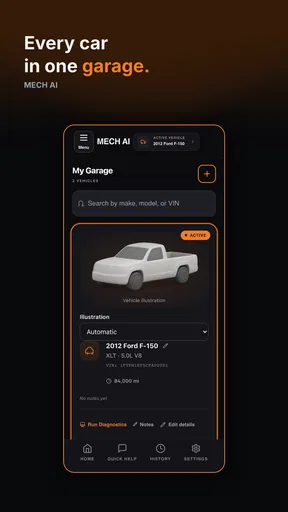


 Analysis by AppCompare
When a dashboard light appears, the hardest part is often deciding what to do next. I like the idea of using an app to turn a confusing warning into a clearer starting point, but I also think it helps to be realistic about what a phone can and cannot establish. MECH AI: Diagnostic & Repair is best approached as a guide for understanding a possible issue and preparing for a sensible next step—not as a substitute for a hands-on inspection when a car may be unsafe.
That distinction matters most when a warning arrives at an inconvenient time: before work, on a trip, or while you are far from a familiar repair shop. An explanation can help you ask better questions and avoid guessing, but a diagnosis from an app is not a guarantee that a particular part has failed. I would use its guidance to organize what I know, then make the safety decision based on how the car behaves and, when needed, get qualified help.
When a warning light is only the beginning
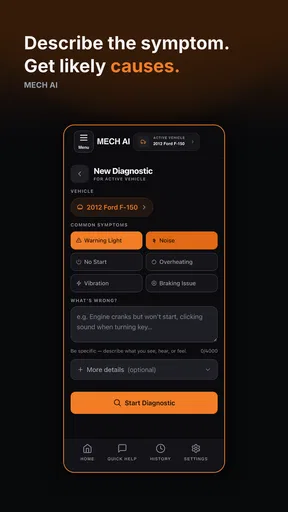
A useful first move is to note exactly what you noticed before opening a diagnostic tool: which light appeared, whether the car changed how it drove, and whether the warning stayed on or came and went. That small bit of context can make any later conversation more useful. It also helps avoid treating a code as the whole story; a stored code points toward a system or condition to investigate, not necessarily a single confirmed repair.
There is a practical trade-off here. A plain code reader may show a code without explaining it in everyday language, while a repair shop can inspect the vehicle directly but may not be immediately available. An AI-oriented mechanic assistant sits between those options: it can make information easier to interpret, yet its advice still depends on the information it receives and should be checked against what the car is actually doing.
If a warning comes with a serious change in handling, braking, steering, smoke, unusual heat, or a strong new noise, I would put safe stopping and professional assistance ahead of app troubleshooting. The same goes for a warning that the vehicle manual identifies as urgent. The app can help you think through what you are seeing, but it cannot make an unsafe car safe to drive.
Small checks that make a first session smoother
The app’s diagnostic value depends on a compatible OBD-II device as well as the phone and vehicle. Before troubleshooting the app itself, I would check that the reader is firmly seated in the vehicle’s OBD-II port and that the phone is connected to the reader in the way its instructions require. A loose connection or an incompatible device can look like a software problem even when the app is working normally.
It is also worth checking the basics before interpreting an incomplete result: confirm the vehicle is in the state the reader’s instructions call for, keep the phone close enough to maintain its connection, and avoid repeatedly unplugging and reconnecting while a scan is underway. If a scan does not start, a calm reset of the connection is a more useful first test than assuming the car has no readable information.
Worth Reading Before You Choose

Flipboard Shows What News Apps Must Do Beyond the Feed

Switching to Android Auto Means Rethinking Your Driving Routine

Google Calendar Makes a Crowded Week Easier to Manage

Ludo King Makes the Most of the Minutes Between Plans

Baby Panda World Brings Quick Play to Modern Phones, but Its Game Library Feels Busy

ESPN’s Live Game View Makes Following Close Games Easier
Compatibility deserves attention before buying hardware. OBD-II access and the information exposed through it can vary by vehicle, reader, and system, so I would confirm that the particular device works with both the car and the app rather than choosing a reader solely because it fits the port. The connector fitting is not, by itself, proof that every desired reading will be available.
MECH AI is a free Auto & Vehicles app from MECH.AI LLC, with optional in-app purchases ranging from $0.99 to $749.99 per item. It is rated for Everyone, runs on Android 7.0 and later, and its current version is 1.1.9. The app has an average rating of 4.2 from around 620 ratings, with over 100,000 installs. I would treat the free starting point and the optional purchases as separate considerations: check what a feature offers and its cost in the app before committing to anything.
Using the app without overreading the result
My most practical tip is to keep a short record before clearing, dismissing, or acting on a warning: the date, the symptoms, the code or explanation shown, and any recent change in how the car behaves. That gives you something concrete to compare if the problem returns and can save time when speaking with a mechanic. It is a low-effort habit that makes an app’s advice more useful without assuming the first interpretation is final.
For a routine concern, I would read the explanation once, then check whether the suggested next step is a simple observation, a basic maintenance task, or a repair that calls for experience and tools. If the advice involves work beyond my confidence, I would use it to frame questions for a professional rather than treating a step-by-step guide as an obligation to attempt the job. A clear stopping point is part of good DIY judgment.
A reader may also wonder whether this is useful without mechanical experience. I think it can be, because translating diagnostic language into something more approachable is valuable on its own. But a beginner should distinguish between understanding a suggestion and being equipped to carry out a repair. If you are unsure how to support a vehicle safely, identify a part, or avoid damaging a component, leave the work to a qualified technician.
Another sensible question is whether it replaces a mechanic. In my view, no. It can help you arrive with a better description of the issue and make routine vehicle information less intimidating, but it cannot inspect wiring, hear a noise in person, or verify that a repair solved the cause. For an intermittent fault or a symptom that does not match the app’s explanation, a direct inspection is the stronger option.
Getting Started with MECH AI
So, you’ve downloaded MECH AI: Diagnostic & Repair—great choice! The setup is pretty straightforward, which is always a win in my book. You just need to connect the app to your car’s OBD-II port using a compatible device. If you’re not a car guru, don’t sweat it, the app walks you through the process with simple, step-by-step instructions.
First Impressions
The interface is sleek and user-friendly. Everything is laid out logically, which means you don’t have to dig through menus to find what you need. The dashboard greets you with a summary of your car’s health, and it’s kind of like having a fitness tracker for your vehicle. You’ll see stuff like engine status, fuel efficiency, and even potential issues that might need attention. I find this incredibly helpful, especially for those of us who aren’t car experts.
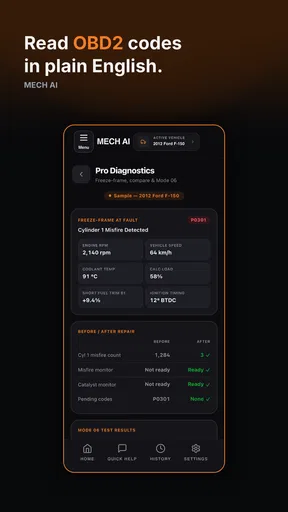
One nifty feature here is the live data feed. You can see real-time information like RPM, speed, and more. It’s a bit of a geeky thrill, if I’m honest. For those who like to keep their eyes on the road, there are customizable alerts that notify you when something’s amiss.
Diagnosing the Problem
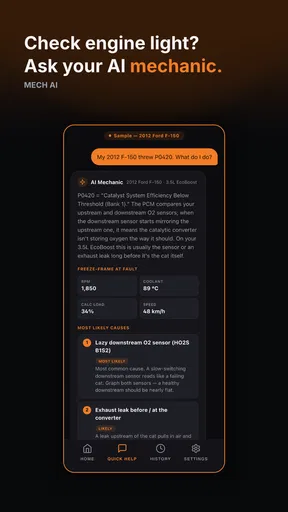
Now, onto the core of the app—diagnostics. Imagine this: you’re driving and suddenly, a warning light pops up. Instead of panicking or running to the nearest mechanic, you just fire up MECH AI. The app quickly scans for trouble codes and gives you a detailed explanation of what might be wrong. It’s like having a mechanic in your pocket who speaks plain English. No more guessing games!
What’s even cooler is that MECH AI offers potential solutions. It’ll give you a rundown of what you can do yourself and what might need professional attention. I tried it out when my car started acting up, and it was spot on with its diagnosis. It even saved me a trip to the mechanic for something I could handle myself.
For an everyday example, imagine the check-engine light appears during a week when you rely on the car for errands and commuting. I would use a scan to get a clearer idea of what the car has detected, note any change in how it runs, and decide whether the issue calls for a prompt workshop visit. That is more useful than guessing from a dashboard symbol alone, but it is not a reason to ignore worsening symptoms or postpone urgent care.
Compared with searching the web for a code, the app’s appeal is having an automotive-focused explanation and possible next steps in one place rather than sorting through forum posts of uncertain relevance. Compared with a basic reader, its guidance may feel more approachable; compared with a mechanic’s inspection, it remains less definitive. That middle ground is the reason I would keep expectations measured rather than expecting a single scan to settle every question.
Repair and Maintenance Tips
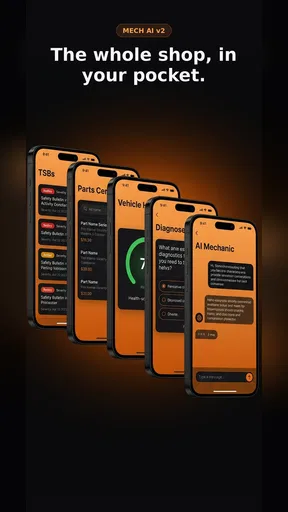
Beyond diagnostics, MECH AI is packed with repair tips and maintenance advice. I found the maintenance reminders handy. You can set up alerts for oil changes, tire rotations, and other routine care. There’s also a handy checklist that ensures you’re not missing anything important.
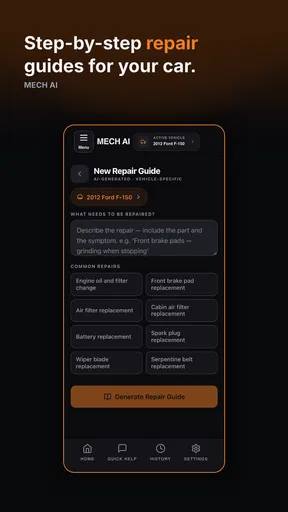
For those who like to get their hands dirty, the app includes step-by-step repair guides. Each guide is detailed yet simple enough for a novice to follow. I tried changing my air filter with the app’s help, and it was a breeze. There’s even a community forum where you can connect with other users to swap tips and tricks.
A useful way to get more from maintenance reminders is to treat them as prompts to check your own service history, not as proof that every interval suits every vehicle. Keep the owner’s manual and any records from previous service in view when deciding what is due. Different driving conditions and vehicle requirements can change what makes sense, so I would use an alert to review the plan rather than follow it blindly.
The guides and community can make a small job feel less daunting, but they also create a judgment call: a procedure that looks simple may still involve a tool, a safety precaution, or a vehicle-specific detail that matters. Before starting, I would compare the instructions with the vehicle manual and make sure I can complete the task safely. If a step does not match the car in front of me, I would stop rather than improvise.
Who will get the most from it
I can see this fitting drivers who want to understand a warning before calling a shop, people who enjoy keeping an eye on vehicle information, and owners who already handle straightforward maintenance. It can also help someone who feels out of their depth in a repair conversation by giving them a starting vocabulary and a way to describe what the car reported.
It is less suitable for someone expecting a guaranteed fault diagnosis, a replacement for scheduled inspections, or a tool that makes every repair beginner-safe. It may also frustrate drivers who do not want to connect an OBD-II device or who would rather have a mechanic take responsibility for interpreting symptoms. In those cases, a direct appointment or a simple code reader used by a professional may be the better fit.
One limitation I would keep in mind is that vehicle data can be incomplete or misleading when a connection is unstable, a reader is not compatible, or a symptom is not captured by the information available through the port. If the app gives an answer that conflicts with the way the car behaves, trust the real-world warning signs and seek another assessment. The most helpful role for the app is to support a decision, not make it for you.
My Final Thoughts
So, is MECH AI: Diagnostic & Repair worth your time? Absolutely! It’s a smart tool for anyone who wants to take control of their car’s health without constantly visiting the mechanic. The app is intuitive, packed with useful features, and genuinely empowers you to understand your vehicle better.
For me, the peace of mind it offers is invaluable. Whether you’re a car newbie or a seasoned enthusiast, MECH AI has something to offer. It’s like having a trusty co-pilot ready to assist whenever those pesky warning lights decide to make an appearance.
So, give it a shot and see how it can transform your car maintenance game. Happy driving, and may your dashboard always stay light-free!
Pros
- AI-driven diagnostics enhance accuracy.
- User-friendly interface for all skill levels.
- Comprehensive repair guides included.
- Real-time updates on car health.
- Supports a wide range of vehicle models.
Cons
- Requires constant internet connection.
- Limited offline functionality.
- Subscription model might be pricey.
- Some features locked behind paywall.
- Occasional glitches in older devices.
FAQs for MECH AI: Diagnostic & Repair
What is MECH AI: Diagnostic & Repair and how does it work?
MECH AI: Diagnostic & Repair is an advanced application designed to assist users in diagnosing and repairing mechanical issues in vehicles. It utilizes AI algorithms to analyze data from your car's onboard diagnostics system, providing detailed reports and suggested repair steps. The app is compatible with most vehicle models and aims to save time and money by offering precise solutions.
Is MECH AI: Diagnostic & Repair compatible with all car models?
MECH AI: Diagnostic & Repair is compatible with a wide range of vehicles, thanks to its extensive database of car models and makes. However, it is recommended to check the app's compatibility list on the official website or within the app to ensure your specific vehicle model is supported. Compatibility may vary based on the car's onboard diagnostics system.
What are the key features of MECH AI: Diagnostic & Repair?
The app offers several key features, including real-time diagnostics, comprehensive error code explanations, step-by-step repair guides, and maintenance alerts. It also includes a user-friendly interface and the ability to connect to your vehicle via Bluetooth or OBD-II adapter, making it a versatile tool for both novice and experienced car owners.
Are there any subscription fees or in-app purchases in MECH AI: Diagnostic & Repair?
While the app may be free to download, it typically offers a tiered subscription model to access its full suite of features. There may be in-app purchases for detailed repair guides or additional diagnostic tools. It's advisable to review the pricing details in the app store description to understand the costs associated with premium features.
How reliable is the diagnostic information provided by MECH AI: Diagnostic & Repair?
The diagnostic information provided by MECH AI is highly reliable, as it uses advanced AI technology to interpret data from the vehicle's onboard diagnostics. It offers accurate error code explanations and suggests appropriate repair solutions. However, users should verify critical repairs with a professional mechanic to ensure vehicle safety and functionality.


